


Demo projects
Time Tracking
What is Time Tracking in YouTrack?
The Time Tracking feature in YouTrack is used to monitor how much time team members spend on individual tasks.
Basics
Logging time:
You can log “work items” on issues (tasks), which record who worked on them, when, and for how long.
Manual and automated options:
- You can enter time manually (e.g., 2h 30m)
- It can also be automated using workflows or integrations (e.g., timer apps)
Estimated vs. actual time:
- Estimation – how much time you expect the task to take
- Spent time – how much time was actually used
→ These can be compared
Work item properties:
A time entry can include:
- duration
- date
- user
- description (e.g., “bug fix”, “code review”)
- optionally, a type (e.g., Development, Research)
What it’s used for
- Planning and capacity management
- Transparency in projects
- Reporting (e.g., weekly summaries)
- Billing or accounting (if needed)
Additional features
- Weekly work expectations can be set (e.g., 40 hours)
- Reports can be generated (e.g., by user, by project)
- Can be automated with workflows (e.g., notifications if logged time is too low)
What kind of work the time was spent on
👉 Shows what the time was spent on.
- Grouped by categories (e.g. Development, Documentation)
- You can see how much time went to each type of work
- Example:
- Development: 40h
- Documentation: 32h
- No type: 48h (not categorized)
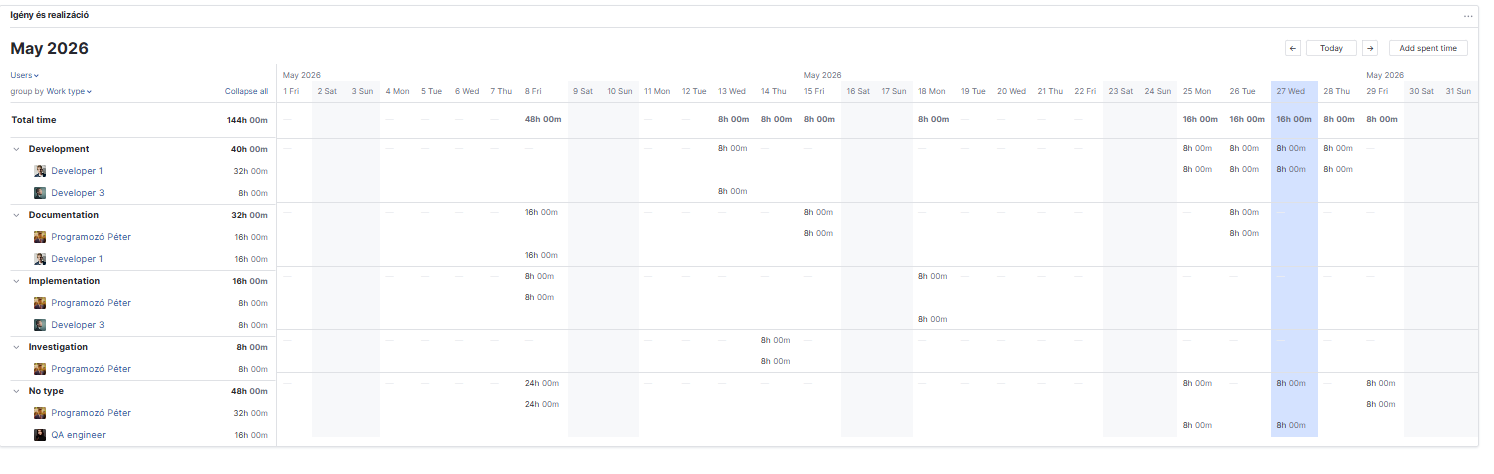
Who spent time on which tasks
👉 Shows who worked on what.
- Grouped by people (assignee)
- Under each person, tasks (issues) are listed
- Example:
- Developer 1: 48h (on 2 tasks)
- QA engineer: 24h (on 1 task)